Showing posts with label interaction design. Show all posts

Thursday, October 07, 2010

Human pattern

Image from : http://www.echostudiochicago.com/sustainability/window-on-the-world

Remember as a child we always wanted to take up that window seat be it travelling in bus, train, car or even at home. We used to love to sit at window. But we never noticed this behavior pattern. Today while going through a presentation on Search and Discovery pattern I came across following,

Window Place: Everybody loves window seats, bay windows, and big windows with low sills and comfortable chairs drawn upto them. - Christopher Alexander in Pattern Language

So here is my take on the design aspect of this pattern.
Psychologically human feel comfortable in peeking outside their small world. They don't want to get confined in that small space. However they don't want to plunge too in that big world. Small world is cozy and comfortable for them. A window provides them a way to be in their comforts and still take a look at the big world around.
You Interface should be something similar to this. User don't want to get into the large world. They need comfort and coziness. However they want to browse through the information. As a designer we should be presenting the complex information to user the way they see world from their window.

Tuesday, October 05, 2010

Design Experience or Design FOR Experience - 1

User Experience Design. This 3 word title looks sounds great. Ask any designer and they'll say this is what they want to do or be.
It all started with Industrial design in the beginning. Then it was Human Factors Design (HFI) where users' interaction with the machine - the actual physical machine with all those levers, pulleys, switches and meters were studied. Then with introduction of digital media and technology it bifurcated into Human Computer Interaction (HCI) and Interaction Design. Designers now specialized in how user interacts with virtual objects constrained in one small screen. All those files, folders, Desktop and blah blah came into existence. With the advancement of technology this tiny little space got more power and technologists started putting more and more stuff in it. It became really hard for an end user to perceive what is inside and to conceive their task effectively. It wasn't race against time, it was more about not confusing the user. For the user of the system its like a maze wherein they have to anticipate what can come next. This cannot be left on mere guess work. Oh I started preaching design.
Coming back to actuals. Now the media and technology and so Information consumption is not just limited to one device/media/platform. You get same information in different format on different devices. Television, Computer - PC/laptop, Mobile phone and now Fridge, Washing machine, audio deck in car. And if all start delivering different interfaces to the user, there'll be no reason for him/her to continue using a service.
There comes the experience. As a designer we are responsible for designing experience of end user. But wait. We don't design experience because it largely depends on context, user and the goal and it is very dynamic. However we can design small artefacts to enhance the experience of user.

So it is designing for experience.

This post was more about arriving at the distinction. Next post will talk more about how do we Design for experience of users.

Monday, April 26, 2010

We should play games

I am a huge fan of computer based games. Not that I don't play outdoors, but with time I have embraced computer games as my favorite pass time. Playing with my kid is lot more fun and enriching, but computer games give me direction in which our future interaction with computers is heading. More and more devices and software and in the core information are becoming tangible and graspable. Future lies in having a system where you can easily sense the appropriate information of the context you are in. And when I say computer based games, they are not just limited to screens. Nintendo Wii is an excellent example of out of screen games, which is marvelous combination of physical and virtual environment. So are Sony's gesture based game control and the latest in news is project Natal by Microsoft. Natal is an excellent example of how gaming is taken a step further to take advantage of computational power to utilize virtual information in a tangible manner.
Project Natal by Microsoft

Nintendo Wii game setup

Take for example Google maps open on a mobile device. If you open google maps on any mobile and tag your current location it'll automatically zoom to your current location and show information around you. May be based on your previous searches it shows sequential information. If you have been searching for restaurants in past on your laptop/pc and/or mobile on google maps, next time you do a search on your mobile it may/will automatically provide you with restaurants information around you. So you are in a game.


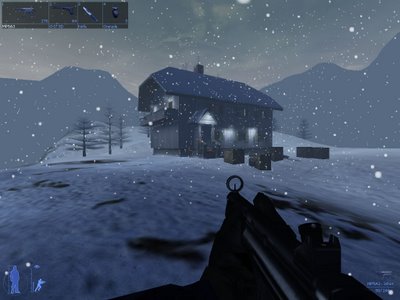
Project IGI game screenshots

A game is nothing but consumption of information in a context which is realistic. I have been playing project IGI. It's a third person, strategy based, shooter game. Information in there, is real like a physical world. You don't have dashboard or graphs or table to play with. you have actual physical objects. And once you are in game you will just play it rather than figuring out what's what? It's quite natural. Just see how lot of information weather, life of soldier, ammunition available, light conditions, time of day etc. can be easily figured out just by looking at the screen. It's real and natural.

If we take scenario of enterprise applications there has been lot of efforts in bringing the complexity of UI down to natural usage and very small amount of time investment to learn them. One way to achieve this is to create a game like scenario and then let the users (system admins, CEO etc.) play with the tangible information about outside world in the same fashion. Challenge is to figure out a way to represent the complex virtual information and relations between them in more natural way. Hence comes data visualization and mapping part of Design. It's altogether a separate topic in itself.

So in a nutshell if you want to learn UI design concepts you better be playing games !

Happy Gaming

Monday, July 27, 2009

Wireframes

Wireframe - this term may not be new to Interaction designers, Usability practitioners and lately project managers. However very little known to root level engineers (mostly UI developers). Well I wasn't familiar to this myself when I was a developer. But we have been practicing this since the start of our projects. We scribble roughly on paper on how UI of a product is going to look like - mostly layout and navigation. However we don't pay attention to minute details of how user would want to look at the product and navigate through it. It was more from system and implementation point of view. Well many of these things got cleared during my study at IDC.

So I slightly went off the topic. The reason for this post is that I just want to highlight some of the key benefits of wireframes. I was reading an article by Michael on Adobe for using Fireworks to do wireframing and export the design into css and html (that's a great relief for developers).
Following is the link >>
Michael list downs some of the key benefits of Wireframing. An excerpt from his article.
  • Wireframes help you communicate the fact that your design is a work in progress—and therefore subject to change based on feedback
  • Wireframes help ensure that the functional design is evaluated separately from the visual design
  • Wireframes don't become dated like comps, so you can reuse those unchanged dialog box sketches in your version 2.0 functional specifications even though you have completely reskinned the application
  • You can create wireframes much faster than you can design high-quality graphics—and it doesn't require much artistic skill
  • Using wireframes instead of comps for initial design reviews helps you to avoid the inevitable "please make the logo bigger" request until the functionality has been decided


Wednesday, May 06, 2009

Smart and Clever

Dan Saffer is one of the respected names in the world of Interaction Design. He has authored books (Designing for Interaction and Designing Gestural Interactions) that are used as textbooks by design community. In his recent online presentation he presents the idea of smart and clever taken from dictionary and how we can use it in designing. They present guidelines for the process of design and work as a checklist at each and every stage.


Wednesday, February 04, 2009

Interesting way of reading news

Have you got bored reading news headlines on those news websites and newspaper.

MSNBC brings a whole new concept of reading news. By games and by visual separation.


This is very good example of visual design. Interaction design doesn't score much here as users get engrossed in the game and forget to read the news !!

Better you play it and read between the balls !!

Monday, November 10, 2008

Interaction Designer

“In the same way that industrial designers have shaped our everyday life through objects that they design for our offices and for our homes, interaction design is shaping our life with interactive technologies – computers, telecommunications, mobile phones, and so on. If I were to sum up interaction design in a sentence, I would say that it’s about shaping our everyday life through digital artifacts – for work, for play, and for entertainment.”
- Gillian Crampton Smith

Friday, October 24, 2008

Music phones

So what different things have you though your music phone (mobile) can do or look like.
The following page shows some of the very creative ways of designing music phones.
Music Phones
I know this will be very short post but can't resist to bring it to your notice.

Sunday, June 15, 2008

Master of Design - Jack of all trades

The title. You thought what it could be?
The T-shirts of all the 44 students at IDC read this line proudly.
We have succesfully completed our Masters in Design. Though the degree has not been given, we put up a great show (exhibition) Degree 44 at Nehru center, Worli, Mumbai.
Here are some pics of the show.
Though the post 2 months old the memories are still fresh.


Friday, December 14, 2007

Interaction Design


Interaction Design:This is what I am specializing in since more than a year. The course though is for a duration of 2 years I think it's not enough for anybody to get all the knowledge of interaction design in this small time span. Interaction Design brings the actual user into picture, his/her aspirations which are directly or indirectly connected with the product and his/her consequent reactions to the products. As an interaction designer you always have to keep few things in mind while designing any product

Give user the command
When a user is operating some product he/she doesn't want to feel fool. They want to master it in the minimum cycles possible. So if your product is fairly complex to understand the user will no longer remain attached to it (unless that his/her job). Giving user the required command to play around with the system and get surprises (not in terms of warning/alert boxes but as helps and wow things) will keep them engaged playing with it. And this will constructively develop the database in the mind of user.

Give the product a wow factor
Unless the product or system surprises user in some sense they are going to feel bored about it. According to Information theory proposed by Shanon, unpredictable things are interesting and vice-versa. Hence if on a website the layout changes everytime a user lands on the home page, the website becomes interesting. But then it has also to help user retain his/her prior knowledge about the system and use it. So the unpredictive part has to aid the prior knowledge to grow knowledge of user about the system.

"Design is not only how it looks, it's how it works"-Steve Jobs
Making your product visually appealing will get the half work done that is bring user to your product. But the main task of retaining him/her to user your product will be handled by how have to designed the system of your product. That is how the user is going to interact with the system and get desired output. Here the desired output should be approximately equivalent to actual output. And that's where the user experience design comes into picture. It's not just about how a user feels about the product at the surface level but how he/she will feel about it for subsequent usages. Will the experience dry up on later use or it'll grow or it'll stay as it was on first use are some of the things to be taken into mind.